Introduction
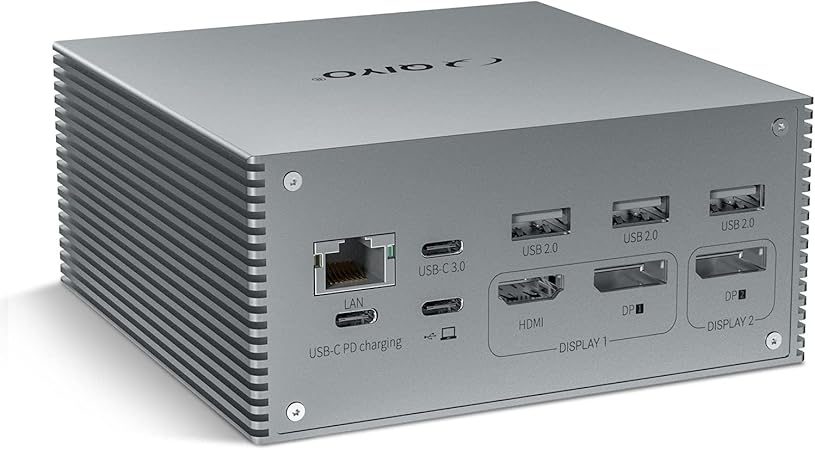
The SRGAFIX 16-in-1 USB C Docking Station is engineered to address the connectivity constraints of modern ultra-portable laptops. As laptops grow thinner, the number of integrated ports often decreases, creating a challenge when connecting multiple devices simultaneously. This docking station offers a robust solution by transforming a single USB-C port into 16 functional connections, including dual 4K HDMI outputs, DisplayPort, USB ports, Gigabit Ethernet, and more. This versatility makes it an optimal choice for professionals who need to maintain productivity regardless of workspace constraints.
Pros & Cons
- Pros
- Supports dual 4K displays for enhanced multitasking on Mac and Windows systems.
- Offers a comprehensive 16-in-1 port configuration.
- Provides 100W power delivery, ensuring devices remain powered without performance dips.
- Compatible with a wide range of laptops including MacBook Pro/Air and various Windows models.
-
Simple DisplayLink driver installation process for dual monitor use.
-
Cons
- Requires installation of a DisplayLink driver for full functionality.
- High initial price may be a barrier for budget-conscious users.
- The physical footprint could be cumbersome for extremely compact workspaces.
Comparison
While there are several USB-C docking solutions available, the SRGAFIX stands out due to its dual 4K display support, which is uncommon in similar products such as the Dell WD19S dock, which mainly offers single 4K capabilities. Furthermore, SRGAFIX's inclusion of both DisplayPort and HDMI gives it an edge over competitors like the Anker PowerExpand 13-in-1, which lacks dual HDMI support and offers fewer connectivity options. Additionally, the 100W power delivery surpasses what is available in budget options like the Wavlink USB C Hub.
User Tips / Usage Guide
-
Install the DisplayLink Driver: For full dual-monitor functionality, ensure the DisplayLink driver is installed before use. This will optimize display performance on both Mac and Windows devices.
-
Use Quality Cables: To prevent any signal quality issues, use high-quality HDMI and DisplayPort cables for your monitor connections.
-
Optimal Port Use: To maximize dock longevity, refrain from overloading the USB ports with high-power devices like external hard drives if not necessary at the same time.
-
Regular Firmware Updates: Check for firmware and driver updates regularly to maintain compatibility with new OS updates and improve stability.
-
Cable Management: Use cable ties to keep cords organized, reducing workspace clutter and avoiding accidental disconnections.
-
Device Safety: Avoid stacking heavy objects on the docking station to prevent damage to its ports and structure.
-
Monitor Power Delivery: Ensure the connected power adapter supports up to 100W to fully utilize the fast charging feature.
Conclusion
The SRGAFIX 16-in-1 USB C Docking Station is ideally suited for professionals who require extensive connectivity options in a centralized device. With capabilities such as dual 4K display support, extensive port options, and robust power delivery, it is particularly beneficial for graphic designers, video editors, and remote employees who rely on multiple peripherals to enhance productivity. Although its price may seem steep, the comprehensive feature set and superior build quality offer compelling value for those who demand a high-performing, multi-functional docking solution.