Introduction
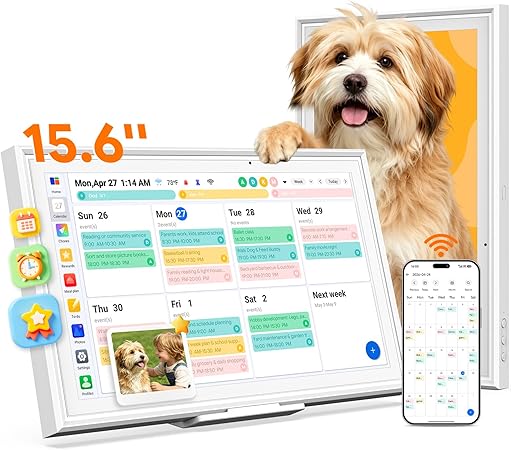
The Omiodo 15.6" Digital Calendar & Photo Frame is designed as an all-in-one family organization hub. It aims to replace traditional sticky notes and planners with a modern, synchronized solution that integrates seamlessly with Google, iCloud, Outlook, and more, delivering real-time updates across several devices. Beyond simply organizing schedules, it offers extra features like an AI meal planner, task & reward system, photo sharing, and even real-time weather updates.
Pros & Cons
- Pros:
- No subscription fees, providing ongoing cost savings
- Easy and quick setup, ready to use out of the box
- Large 15.6" touchscreen with a user-friendly interface
- 64GB storage ensures ample space for photos and data
- AI meal planner optimizes grocery shopping and meal planning
-
Task and reward system encourages children's motivation
-
Cons:
- The one-way sync limitation for some services (e.g., iCloud, Yahoo)
- Relatively basic frame quality in terms of design aesthetic
Comparison
When compared with other digital calendars and photo frames available, the Omiodo model stands out primarily because it doesn't require a subscription. Alternatives like Skylight and Nixplay often lock users into monthly fees for full functionality. Where the Omiodo truly shines is its combination of practical features without any hidden ongoing costs. The AI meal planner alone offers a tangible daily benefit that few competitors include, especially at this price point. However, while design-centric models like the Memento Smart Frame offer a more luxurious look, they typically don't provide the same level of organizational features.
User Tips / Usage Guide
- Get Familiar with the Sync Features: Make sure to connect the calendar to all your primary digital calendars (Google, Outlook) for the most seamless integration.
- Utilize the AI Meal Planner: Regularly update your inventory for effective meal planning and shopping list generation.
- Incorporate the Task & Reward System for Kids: Engage children by setting up tasks and visible rewards to encourage completion and discipline.
- Optimize Photo Sharing: Use the 64GB storage to manage and regularly update family photos, turning the calendar into a dynamic photo frame.
- Check Weather First Thing: Encourage family members to check the weather updates every morning to better plan their day.
- Position Wisely: For best results, place the device in a high-traffic area where all family members can view upcoming schedules and tasks.
- Utilize Auto-Rotation: Mount dynamically according to your space constraints — on a wall or standing on a desk.
- Routine Maintenance: Regularly check for software updates to ensure all features are running smoothly, keeping the device functioning at its best.
Conclusion
For a budget-conscious shopper focusing on value, the Omiodo 15.6" Digital Calendar & Photo Frame is an overall impressive offering. For the price, you get a feature-packed family hub that not only organizes schedules but also introduces efficiency into household tasks like meal planning and chore management. Its lack of subscription fees significantly enhances its long-term value, especially when compared to pricier alternatives tied to ongoing fees. While its one-way sync with some services may be a slight drawback, it remains a superb choice if you're seeking a practical and affordable solution to streamline your family’s everyday organization.