Introduction
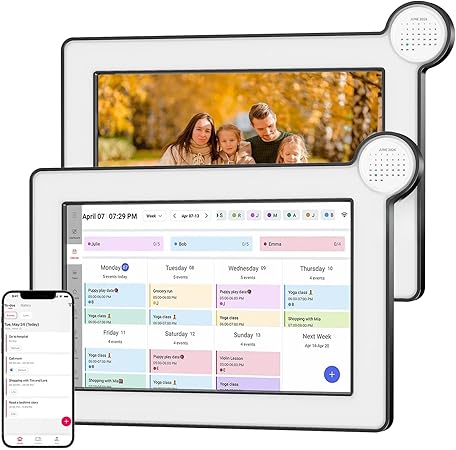
In our fast-paced world, managing time efficiently is no longer a luxury but a necessity. NETTIPS 10.1-inch Smart Digital Calendar steps in to transform chaotic schedules into a seamless flow of daily tasks. This product is not only a formidable organizational tool but also serves as a decorative digital photo frame, adding warmth and personality to your space. Imagine having all your digital appointments synced and accessible at a glance—and then imagine them presented alongside your treasured family photos. That's the life upgrade we’re talking about.
Pros & Cons
- Pros:
- Dual-functionality as both a calendar and a digital photo frame
- Real-time sync with popular calendar apps like Google Calendar and Outlook for effortless updates
- User-friendly setup with Wi-Fi connectivity for seamless integration
- Versatile placement options with both desktop and wall-mount capabilities
- Personalized display that continuously showcases your favorite photos
- Cons:
- Requires constant Wi-Fi connection for real-time syncing
- Additional app download necessary for photo-sharing feature
- Wall-mount bracket not included within the package
Comparison
While the NETTIPS digital calendar impresses with its multifunctional design and high-resolution display, similar products like the Nixplay Smart Frame focus primarily on photo-sharing rather than organizing tools. Traditional wall calendars offer a tactile experience but lack the digital connectivity and integration. Compared to competing smart calendars, NETTIPS offers a significant advantage with its seamless app syncing and the ability to transform into a dynamic digital photo frame, placing itself as a leader for integrated family and work life management.
User Tips / Usage Guide
-
Initial Setup: Connect your digital calendar to Wi-Fi right out of the box. This ensures you start receiving updates and can access all the calendar features immediately.
-
App Integration: Sync with your current calendar apps like Google Calendar or iCloud. This eliminates the hassle of manual updates and prevents schedule overlaps.
-
Photo Sharing Tip: Use the Whale Framely app for quick and easy photo uploads. Encourage family and friends to share moments, adding a personal touch to your workspace or home.
-
Optimal Placement: Choose a central location in your home or office for the calendar. Whether it’s the kitchen where everyone gathers or your home office, make sure it’s easily accessible for constant viewing.
-
Organize Family Life: Utilize the task list feature to assign and track family chores or meal plans. Each member can look forward to a reminder of their responsibilities.
-
Utilize Reminders: Set reminders for upcoming appointments, birthdays, or events. This ensures nothing slips through the cracks in your agenda.
-
Change Themes Regularly: Update the background themes to match seasonal moods or decor. It keeps the digital calendar visually refreshing and engaging.
-
Make Full Use of Real-Time Sync: Updates to your phone calendar should automatically appear on the digital calendar. This ensures that you never miss an update across devices.
Conclusion
The NETTIPS 10.1-inch Smart Digital Calendar is more than just a gadget—it's an intuitive partner in juggling life's myriad commitments. After a week of daily use, I found my routines harmonious and seamlessly managed, all while admiring the ever-changing display of cherished memories. It's an attractive gift option for anyone straddling family plans and work deadlines. With its reliable customer support and a one-year warranty, this is an investment that promises peace of mind and a smoother, more connected life. Whether you’re a busy professional or a bustling homemaker, this digital calendar is an essential addition to your lifestyle.