Introduction
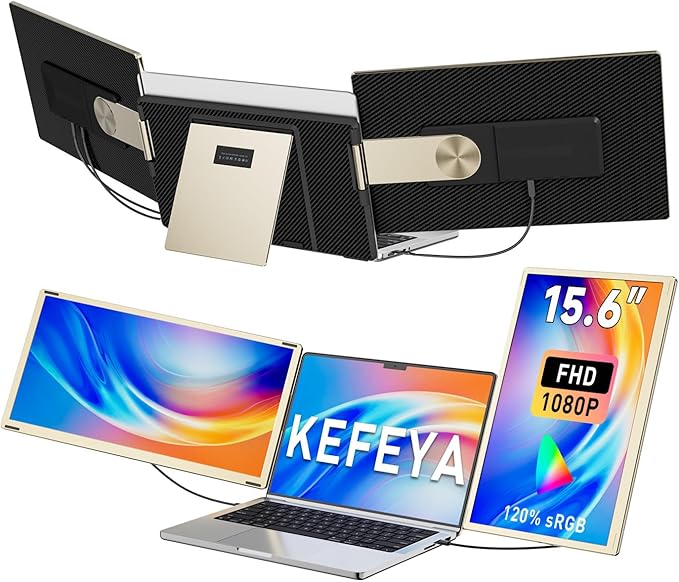
The KEFEYA Portable Laptop Monitor Extender is designed for those who frequently work on the go and require a more extensive display setup without being tethered to a traditional office setting. The 15.6-inch full HD extender connects effortlessly to a laptop and offers multiple display modes to considerably enhance productivity. Whether you're a remote worker, IT professional, or just someone who enjoys an immersive computing experience, this product aims to transform your laptop into a powerful workstation.
Pros & Cons
- Pros:
- Easy plug-and-play setup without the need for additional drivers.
- Provides a full 1080p resolution for clear and vibrant visuals.
- Offers portability with a detachable design and an included leather bag.
- Compatible with a wide range of operating systems.
-
Multiple display modes including mirror, extended, portrait, and landscape.
-
Cons:
- Not compatible with Mac M1/M2/M3/M4 chips without an additional adapter.
- Can add noticeable bulk to your setup.
- Price point might be a tad high for budget-conscious buyers.
Comparison
When looking at alternatives in the market, products such as the Duex Pro offer similar functionalities at a comparable price point. However, the KEFEYA extender distinguishes itself with a larger 15.6-inch display and a rotating capacity of 235 degrees. Some cheaper options may lack the resolution quality or the plug-and-play versatility but may be sufficient for more straightforward needs. For the price, you get robust compatibility and a well-integrated solution for multiple device types.
User Tips / Usage Guide
-
Ensure Compatibility: Before purchasing, confirm that your device is compatible or consider obtaining the necessary adapters for specific CPUs.
-
Adjust Brightness: Use the manual controls to adjust brightness and contrast for optimal viewing according to your working environment.
-
Carry Carefully: Use the included leather bag to avoid damage while traveling with the monitor extender.
-
Secure Attachment: Ensure the extender is securely attached to your laptop to prevent any accidental detachment.
-
Cable Management: Use cable organizers to keep your workspace tidy, especially if using multiple cables for connection.
-
Exploit Multiple Modes: Experiment with different display modes to find the one that maximizes your productivity. Mirror for presentationsor extend for multitasking.
-
Check Power Needs: Some laptops may require additional power supplies for optimal performance, especially when running intensive applications.
Conclusion
For budget-conscious shoppers who prioritize value, the KEFEYA Portable Laptop Monitor Extender offers a solid blend of portability, display quality, and usability for its price tier. While it comes with a few considerations like the need for compatibility adapters for specific systems, it shines in its functional versatility and ease of use. For the price, you get a competitive product that could improve your productivity significantly if you're a regular multitasker or need extra screen real estate on the go. If you're in the market for an effective and portable screen extension, the KEFEYA extender certainly earns its keep.