Introduction
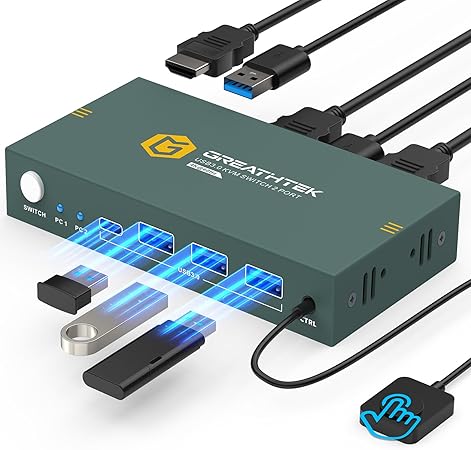
In a world where multitasking across multiple devices has become the norm, the GREATHTEK 2-Port HDMI KVM Switch is a tool many didn't know they needed. Whether you are a work-from-home professional toggling between a personal and work laptop, or a tech enthusiast managing several computers, this device promises to simplify your digital workspace. With its ability to connect two computers to a single monitor, while also sharing USB 3.0 peripherals, the GREATHTEK KVM switch seeks to streamline your tech-heavy lifestyle.
Pros & Cons
- Pros:
- Simplified Setup: Plug and play ensures easy installation with no need for software.
- Flexibility: Supports multiple devices (PC, Laptop, PS4) and operating systems.
- High Resolution Support: Supports up to 4K resolution at 60Hz.
- Switching Options: Offers both button and wired remote switching.
-
USB 3.0 for Fast Data Transfer: Share devices like scanners and printers between computers effortlessly.
-
Cons:
- No Hotkey Switching: Lacks the convenience of keyboard shortcuts.
- Cables Not Fully Included: Requires additional HDMI cables, adding to setup cost.
- Dependent On Compatible Display Devices: Requires displays that support the communicated resolution for optimal performance.
Comparison
Compared to its competitors, the GREATHTEK device stands out for its robust switching options and broad compatibility with various devices and systems, including gaming consoles. While other KVM switches might offer quick hotkey switching, they often compromise on flexibility with peripherals or display options. Meanwhile, brands such as TESmart might offer more HDMI cable support but often at a higher price point with less intuitive user interfaces. The competitive price of GREATHTEK makes it a viable option for those who prioritize value without sacrificing functionality.
User Tips / Usage Guide
- Ensure Cable Compatibility: Before setting up, check that you have the required HDMI cables to connect all devices and maximize functionality.
- Monitor Resolution Configurations: Set your monitors to the supported resolution (ideally 4K @ 60Hz) to enjoy high-quality displays.
- Switching Between Devices: For seamless switching, use the wired remote control if your workspace layout allows for it, to save time and prevent wear on the device.
- Label Your Cables: Keep your workspace organized by labeling cables for each device, which can simplify troubleshooting and re-cabling.
- Position for Convenience: Place the KVM switch within arm’s reach if you prefer using the button switch method.
- Firmware Checks: Occasionally check for any firmware updates from GREATHTEK to ensure optimal performance and compatibility.
- Peripheral Sharing: When connecting USB devices like keyboards and mice, plug them directly into the switch to avoid connectivity issues.
- Secure Connections: To maintain a stable connection, ensure all cables are firmly connected, especially during device setup.
Conclusion
The GREATHTEK 2-Port HDMI KVM Switch effortlessly accommodates a variety of lifestyle tech demands. Whether it’s managing dual work environments or integrating multimedia setups, this switch delivers on simplicity without sacrificing high performance. Although it requires a few additional components for full setup, its strengths in flexibility, resolution support, and easy usability justify these extra steps. For someone in need of a reliable way to toggle between multiple devices and peripherals, this KVM switch is a dependable, value-for-money solution. Ultimately, it brings efficiency to your daily routine, helping you stay productive and connected.