Introduction
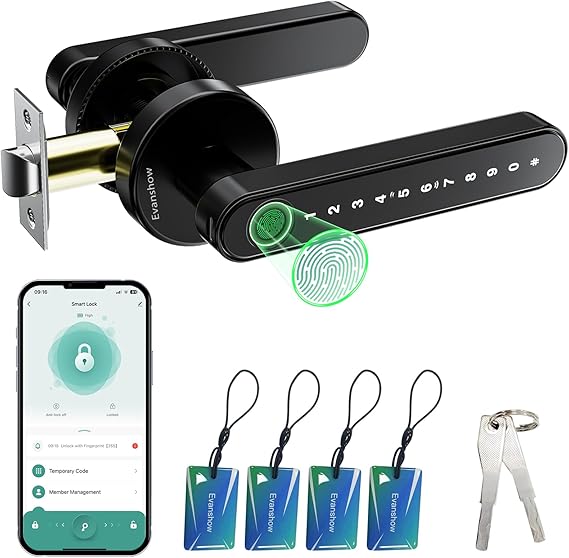
The Evanshow Smart Door Lock addresses a significant challenge in modern home security: balancing convenience with robust access control. Traditional locks are susceptible to risks such as key duplication and opportunistic burglaries. This smart lock aims to eliminate these vulnerabilities by providing keyless entry through multiple secure methods, including fingerprint recognition, a digital keypad, and smartphone app integration. It targets residential users who seek enhanced security without compromising ease of access or requiring extensive modifications for installation.
Pros & Cons
- Pros:
- Advanced biometric fingerprint recognition for fast and reliable unlocking (0.5 seconds).
- Multiple access methods including keypad, app, NFC card, and mechanical keys.
- User-friendly app interface for managing access and tracking entry logs.
- Auto-lock feature enhances security by securing the door after a pre-defined duration.
-
Easy installation without the need for drilling or professional tools.
-
Cons:
- Initial setup requires careful administrative fingerprint registration, which can be a potential security loophole if not performed correctly.
- Cannot recharge internal batteries; relies on external power through USB for emergency.
- The app reliability depends heavily on the consistent performance of the user's smartphone.
Comparison
When stacked against similar products like the August Smart Lock Pro and the Schlage Encode, the Evanshow Smart Door Lock offers a distinct advantage with its biometric entry point and a no-drill installation process. Competitors like August prioritize retrofit capabilities and compatibility with existing deadbolts, while Schlage's Encode opts for built-in Wi-Fi for remote access—features that might appeal to different segments of the market. However, Evanshow remains competitive with its multifaceted entry methods and enhanced security settings like auto-lock.
User Tips / Usage Guide
-
Register an Administrator Fingerprint: Before use, make sure to register an administrator fingerprint. This secures your device from unauthorized access out of the box.
-
Regularly Update the App: Periodic updates can offer enhanced security measures and bug fixes; make sure to keep the app up-to-date for optimal performance.
-
Use Auto-Lock Feature: Activate the auto-lock feature to automatically secure your door after a specified time. This minimizes the risk of leaving your door unlocked.
-
Familiarize with Backup Options: Know the location of your mechanical key and ensure easy access in emergencies. Set up multiple unlock methods as fail-safes.
-
Monitor Battery Life: Keep an eye on your lock's battery status via the app. Maintain an external power bank handy for emergency use when batteries are low.
-
Configure Access Levels: Assign access codes as per need, and consider temporary codes for guests. Review and alter permissions as required for heightened control.
-
Periodically Clean the Fingerprint Sensor: Ensure the fingerprint scanner remains clear of dust and smudges to maintain optimal reading accuracy and performance.
-
Keep Spare Keys Handy: Despite being a smart lock, mechanical keys are imperative for unplanned malfunctions; store them securely yet accessibly.
Conclusion
The Evanshow Smart Door Lock is ideal for individuals focused on elevating their home security framework without making invasive adjustments to their current door setup. It particularly suits tech-savvy users who appreciate the convenience of app management and multiple keyless entry methods. However, it requires diligence in the initial configuration and an occasional check on battery life. Those who prioritize a traditional key backup alongside modern features will find this system suits their needs well.