Introduction
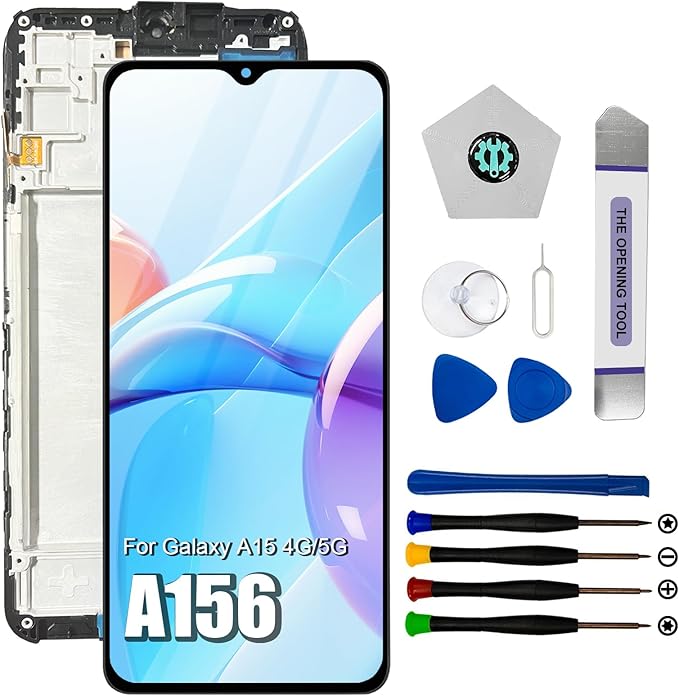
Smartphone screens are notorious for being both a critical component and a common point of failure. Dropping your phone can shatter the screen, rendering your device unusable. The Dinow Samsung Galaxy A15 Screen Replacement offers a reliable solution for those looking to revive their damaged Samsung Galaxy A15. Designed for both the 4G and 5G models, this screen replacement includes a frame and repair tools, aiming to restore your device's functionality to its original state.
Pros & Cons
- Pros:
- The replacement kit is compatible with multiple Samsung Galaxy A15 model numbers.
- Comes with a pre-installed frame, making installation more straightforward.
- Includes repair tools needed for the screen replacement.
- 9H hardness glass provides improved durability and scratch resistance.
-
Well-packaged to ensure no damage during shipping.
-
Cons:
- Does not include installation instructions in the package.
- Installation might still be challenging for those without prior experience.
- Requires the user to source installation guidance from external videos.
- Limited customer support for installation problems.
Comparison
When compared to other screen replacement kits on the market, the Dinow screen replacement stands out due to its comprehensive compatibility with multiple variations of the Galaxy A15 models, such as SM-A155F/DS and SM-A156P/DS. Unlike cheaper options that might not include the frame, Dinow's version does, which simplifies the replacement process and ensures better alignment and fitting. While some competitors offer online installation guides through QR codes, Dinow requires users to independently locate resources online.
User Tips / Usage Guide
-
Verify Model Compatibility: Ensure that your device model matches one of the supported models (e.g., SM-A155F, SM-A156P) before purchasing.
-
Gather Information: Source comprehensive installation videos on YouTube. Search specifically for "Samsung Galaxy A15 LCD replacement screen" for the best results.
-
Organize Your Space: Ensure that you have a clean, well-lit area to perform the replacement.
-
Be Cautious with Adhesives: Avoid overusing adhesives when transferring components from the old screen to prevent damage.
-
Adjust Sensitivity Settings: After installation, go to your phone settings to re-calibrate or tweak touch sensitivity as needed.
-
Test the Screen: Before final assembly, connect the new screen to your device to test its functionality.
-
Practice Patience: Take your time with the replacement to avoid causing additional damage to your device.
-
Contact Support If Needed: If complications arise, contact Dinow’s customer support promptly.
Conclusion
The Dinow Samsung Galaxy A15 Screen Replacement is a robust solution for anyone looking to fix a damaged screen on their Galaxy A15 device. Where this truly shines is in its build quality and comprehensive model coverage. The inclusion of a pre-installed frame and repair tools reflects Dinow’s commitment to user experience. However, the lack of direct-to-hand instructions can be a hurdle for the uninitiated. With careful handling and preparation, the attention to detail here is notable, making it a worthy investment that can save a previously unusable phone. For those with some DIY spirit, this product is highly recommended.