Introduction
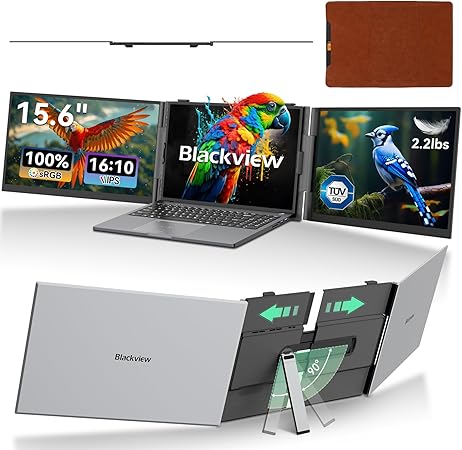
As a parent juggling work from home while managing a bustling household, finding efficient ways to balance productivity is a game-changer. Enter the Blackview DCM8 Triple Screen Laptop Extender. This nifty gadget is here to help boost your productivity, offering a three-screen experience seamlessly from your laptop. If you’re a work-from-home parent like me, or someone dealing with limited workspace, this could be the tech upgrade you've been waiting for. With its ultra-slim design, the DCM8 removes the clutter and setups seen with traditional monitors, making it perfect for small spaces or on-the-go scenarios.
Pros & Cons
- Pros:
- Portability: Slim and lightweight design means it fits effortlessly in your laptop bag.
- Ease of Use: Plug and play functionality requires no software installations.
- Display Quality: 1080P FHD IPS screen offers excellent color accuracy and wide viewing angles.
- Eye-Friendly: TÜV SÜD’s low blue light certification helps protect against eye strain.
-
Compatibility: Works with most devices across different operating systems—Windows, Mac, Android, Linux.
-
Cons:
- Price: It’s on the pricier side compared to other single monitor extenders.
- Port Dependency: Requires USB-C ports—adapters necessary for older laptops.
- Power Draw: May increase battery drain when not connected to power source.
Comparison
When you compare the Blackview DCM8 to something like a standard single portable screen, the benefits are clear. With the DCM8, you essentially transform your workspace into a multi-monitor setup without the physical bulk. This means more screen real estate which is crucial for professionals like graphic designers, or homeschooling parents who need multiple resources open at once. Opposed to another similar product like the OFIYAA P2 that might offer similar features, the DCM8 stands out with its slimness and quick-connect setup ideal for frequent travelers or busy environments.
User Tips / Usage Guide
-
Ensure USB-C Compatibility: Before purchase, check if your laptop has USB-C ports to avoid needing separate adapters.
-
Proper Setup: Use the adjustable kickstand for stabilizing the screens, especially on uneven surfaces.
-
Optimize Layout Settings: Arrange screens in your display settings to match your workflow, enhancing seamless transitions between tasks.
-
Regular Cleaning: Use a microfiber cloth to keep it dust and fingerprint-free, maintaining clear visuals.
-
Monitor Battery Usage: When detached from power, monitor your laptop's battery life since additional screens require more energy.
-
Travel Protection: Always use the protective case included for safe transportation, especially if you're frequently on the go.
-
Adjust Stand Angles: Take advantage of the 180-degree adjustable screen angles for ergonomic comfort.
Conclusion
If you are someone looking for ways to level up your productivity game without crowding your living area, the Blackview DCM8 Triple Screen Laptop Extender is certainly worth considering. Although it does stretch your budget a bit, the long-term payoffs in terms of multi-screen efficiency and the convenience of mobility speak volumes. For those needing an adaptable, robust setup, especially in homes with little ones constantly on the move, this screen extender is a pragmatic choice that delivers genuine value for money.