Introduction
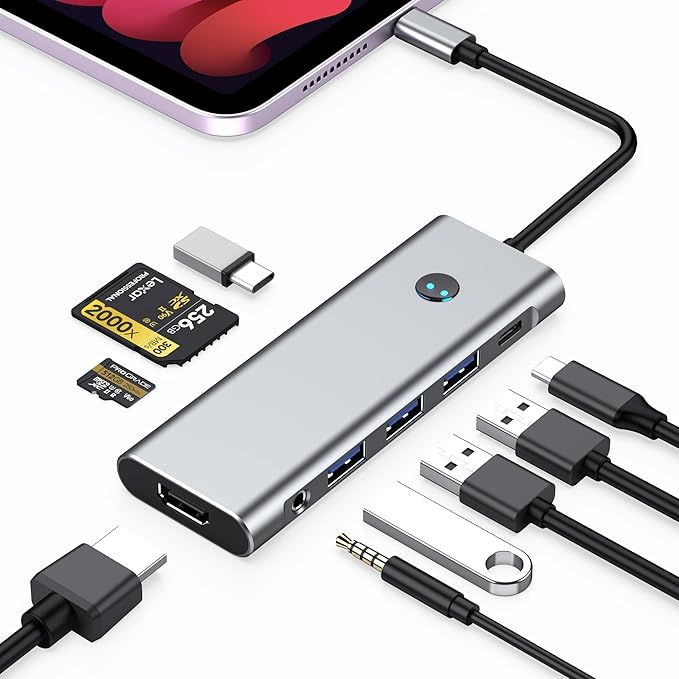
The BKELHS USB C Hub addresses a recurring issue among iPad Pro and other compatible device users: limited connectivity options. By transforming a single USB-C port into a versatile 9-in-1 docking station, this product promises enhanced connectivity for users who need multiple device interfaces, seamless media streaming, and efficient power management. This hub is particularly appealing to tech enthusiasts, remote workers, and content creators who require both robust performance and streamlined functionality.
Pros & Cons
- Pros:
- Comprehensive connectivity with 9 ports including HDMI, USB-C PD, USB 3.0, and SD/microSD readers
- Supports 4K@60Hz via HDMI, ideal for high-resolution displays
- 100W power delivery ensures efficient charging without port trade-offs
- Lightweight design facilitates portability
-
Fast data transfer with 5Gbps speeds
-
Cons:
- Metal casing can run slightly hot under prolonged use
- Incompatibility with some older devices lacking USB-C
- Audio jack offers limited control functionality
Comparison
When compared to similar offerings in the market such as Anker and Satechi hubs, the BKELHS USB C Hub is noteworthy for its slightly more affordable price point and similar specifications. While all offer 4K HDMI support and multiple USB ports, the BKELHS hub scales marginally higher in terms of power delivery at 100W compared to typical 60W-85W coverage by competitors. However, Anker generally provides more refined software integration, which might be crucial for high-demand, professional environments.
User Tips / Usage Guide
-
Update Device Firmware: Ensure all devices connected via the hub have up-to-date firmware to avoid compatibility issues.
-
Optimal Power Adapter: Use a 100W power adapter for sustained power output without hindering port performance.
-
Cable Management: Utilize short, high-quality cables especially for HDMI connections to maintain data integrity.
-
Heat Management: Keep the device on a flat, conductive surface to improve heat dissipation and enhance performance longevity.
-
Device Prioritization: Connect high-demand devices (e.g., external drives) first to the USB 3.0 ports to capitalize on faster data transfer speeds.
-
Audio Settings: Adjust audio outputs on the iPad Pro before connecting to optimize sound quality through the hub's audio jack.
-
Regular Cleaning: Periodically clean the ports with compressed air to ensure reliable connectivity.
-
Screen Mirroring Updates: Confirm all driver updates for optimized 4K mirroring, especially after OS updates of the host device.
Conclusion
The BKELHS USB C Hub serves as a premium solution for users needing extensive connectivity without excessive investment. Suitable for professionals reliant on high-performance peripheral expansions, it appeals to anyone seeking enhanced productivity through seamless integration of accessories and devices. Creators and frequent travelers will appreciate the lightweight yet powerful design that simplifies their daily tech ecosystem.