Introduction
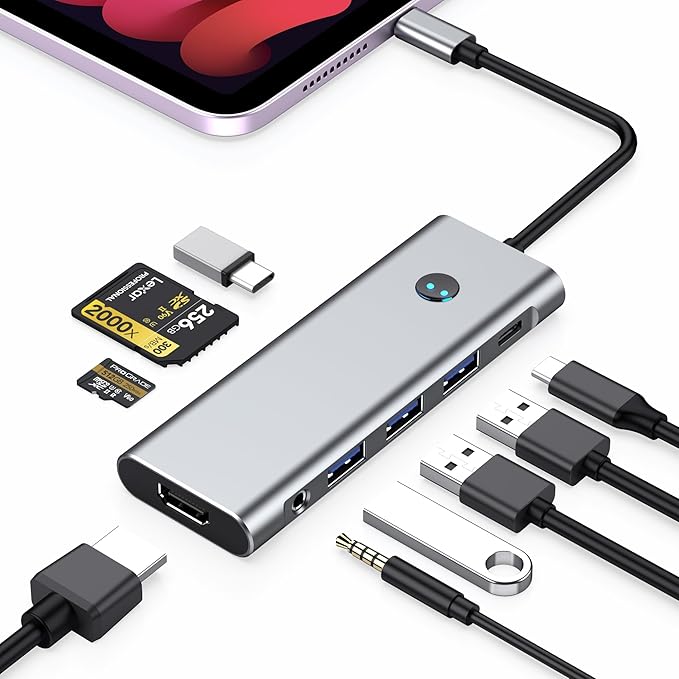
In an era where tablets like the iPad Pro are evolving into full-fledged computing devices, having a multi-functional port like the BKELHS USB-C Hub can elevate your productivity. Offering a plethora of ports that turn a single USB-C connection into a station ready for everything from charging to file transfer, this hub is designed for those who need flexibility and power in one compact accessory. Whether you're a digital nomad, student, or professional, a robust USB-C hub can be indispensable.
Pros & Cons
- Pros:
- Offers a comprehensive 9 ports including HDMI, USB-C PD, USB 3.0, and audio jack.
- Supports high-speed data transfer up to 5Gbps.
- PD pass-through charging up to 100W ensures your device stays powered without sacrificing port functionality.
- 4K HDMI output for detailed display mirroring or extension.
-
Compact and lightweight, easy to carry around.
-
Cons:
- Lacks an Ethernet port, which could be essential for certain professional environments.
- The metallic finish might show wear over time.
- Higher power demand could require stronger power adapters for optimal charging.
Comparison
Compared to similar products, like the Anker PowerExpand 9-in-1 USB-C Hub, the BKELHS model stands out with its priority on charging capacity and high-speed data transfer. However, competitors like the HyperDrive can offer added points like an Ethernet port or additional USB-C connections. Still, for users focused primarily on display output, charging, and robust file management, this BKELHS hub offers a well-rounded package.
User Tips / Usage Guide
- Prevent Drain: Use a power adapter of at least 30W with the PD port to avoid device battery drain during multitasking.
- Secure Connections: Ensure firm connections when using the HDMI port to avoid flickering or disconnection, especially crucial during presentations.
- Firmware Update: Regularly check for firmware updates that may enhance compatibility and performance.
- Cable Management: Use shorter, quality cables to maintain orderly desk space and reduce physical strain on connections.
- Heat Management: Allow for proper ventilation if the hub is used intensely for extended periods to prevent overheating.
- Device Compatibility: Always cross-check your device's power and display specifications to ensure maximum compatibility with hub capabilities.
- Port Selection: Prioritize port usage depending on activity. For high-demand tasks, ensure the hub is freed from unnecessary connections.
- Safe Removal: Safely eject any storage device connected to the hub before physically disconnecting to prevent data corruption.
Conclusion
The BKELHS USB-C Hub is a versatile companion for individuals needing to transform their iPad Pro or similar devices into a competent workstation. By expanding a single connection into multiple ports without hindering performance—especially with considerations like 4K display and high-speed data transfer—it earns its place on the desk of professionals and students alike. However, if network connectivity through an Ethernet port is a necessity, additional solutions might better fit your needs. For most, this hub offers an excellent mix of power, precision, and portability.