Introduction – Problem + Solution Overview
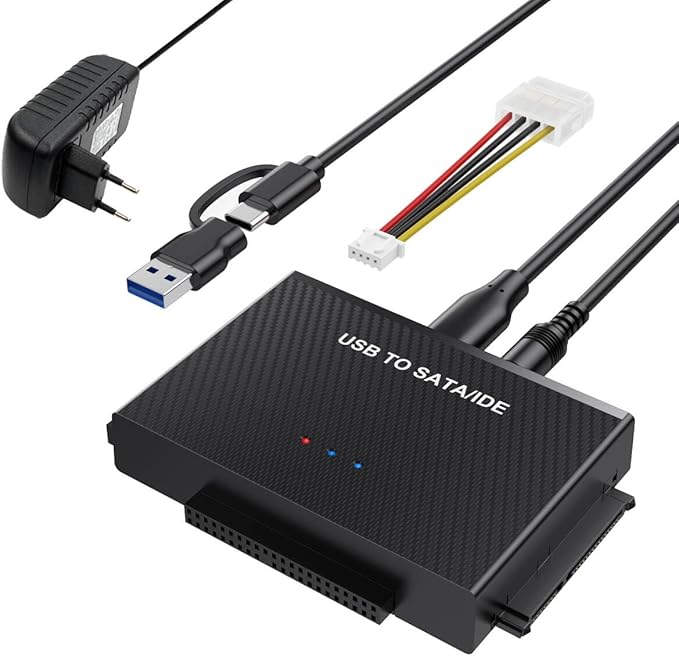
Ever found yourself in a bind because you couldn't easily access data from your old hard drives? Enter the BKELHS USB 3.0 to SATA IDE Adapter. This nifty gadget bridges the gap between old IDE or SATA hard drives and your modern devices. Compatible with various HDD and SSD, this adapter allows you to swiftly read, write, and transfer data. It's an essential tool when retrieving memories from those ancient disks or migrating to a new storage solution.
Pros & Cons
- Versatile Compatibility: Supports a wide range of 2.5"/3.5" HDDs and SSDs, plus optical drives.
- High-Speed Transfer: The USB 3.0 connection ensures data transfers up to 5Gbps.
- Design Flexibility: Features both USB and USB-C compatibility, broadening the device scope.
- Hassle-Free Operation: Hot-swappable letting you connect/disconnect without rebooting.
- On/Off Protections: Includes power switch and LED indicators for easy monitoring.
- Stable Power Supply: Comes with a 12V/2A power adapter, crucial for older drives.
- Setup Complexity: May require jumper settings and initialization for older drives.
Comparison
When stacked up against competitors, the BKELHS adapter stands out for its dual USB and USB-C interface, which is indeed a rarity. While many adapters cater only to either IDE or SATA connections, this one handles both with finesse. Compared to others, it offers a superior data transfer rate and more user-friendly design features like hot-swapping and cross-compatibility with USB 2.0/1.1.
User Tips / Usage Guide
- Initial Setup: For first-time use, ensure you initialize new drives via "Disk Management" on your computer.
- Proper Power Connections: For 3.5” IDE drives, always use both the power adapter and the 4-pin power cable.
- USB Cord Care: Use the provided dual-headed USB/USB-C cable to secure stronger connections with any device.
- Jumper Settings: When connecting an IDE drive, set the jumper to "slave" for accurate recognition.
- Avoid Data Corruption: Address any data transfer interruptions by avoiding unplugging during active transfers.
- Assess LED Indicators: Utilize the LED light to assess the power and data activity status.
- Keep it Cool: Consider adequate ventilation to prevent the device from overheating during extended transfers.
- Backup Data Frequently: While stable, have a regular backup practice in place to avoid data loss.
Conclusion
For those of us who revel in breathing life into forgotten tech and seamlessly migrating data across devices, the BKELHS USB 3.0 to SATA IDE Adapter is a worthwhile discovery. It integrates ancient and contemporary systems with ease and efficiency, aided by its user-friendly design and broad compatibility. Ideal for tech enthusiasts, IT professionals, or anyone with a treasure trove of old drives, this adapter caters perfectly to those seeking a reliable, quick-transfer solution without the fuss.