Introduction
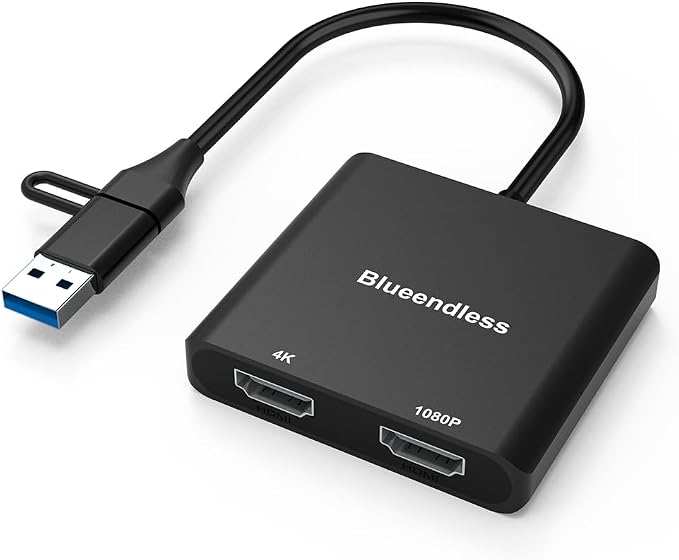
The BKELHS USB 3.0 to Dual HDMI Adapter aims to solve a common modern problem: insufficient screen real estate on computers and laptops. For professionals and students who multitask daily, additional screen space can significantly enhance productivity and workflow efficiency. This adapter promises to deliver a smooth dual-monitor solution with just one USB connection. It offers users the flexibility to mirror or extend their displays, supporting resolutions up to 4K at 30Hz. Despite its promising features, it’s tailored for specific uses, not supporting heavy graphics applications or HDCP-protected content like Netflix or Hulu.
Pros & Cons
Pros:
- Supports dual-monitor setup through a single USB connection
- Resolutions up to 4K on the main screen at 30Hz
- Wide software compatibility across recent Windows, Mac, and Chrome OS versions
- Lifetime technical support and a 24-month warranty
Cons:
- Requires driver installation; not a plug-and-play device
- Limited performance on graphics-intensive applications and games
- Unable to stream HDCP-protected content
- USB-C to HDMI adapter may underperform compared to high-end dedicated GPUs
Comparison
Compared to similar products like the Wavlink USB 3.0 to HDMI/DVI Adapter, the BKELHS adapter offers the advantage of dual HDMI outputs from the get-go, with no need for additional connectors. However, it requires driver installation, unlike Wavlink's more user-friendly plug-and-play models. This trade-off can be acceptable for those who aren't intimidated by tech setups. Performance-wise, its dual output feature positions it favorably among budget solutions, but those requiring smoother 60Hz visuals might find higher-priced alternatives like the StarTech USB 3.0 to Dual HDMI Adapter more fitting.
User Tips / Usage Guide
-
Install Drivers First: Before connecting the device, download and install the latest drivers as per the quick start guide to avoid functionality issues.
-
Avoid Heavy Graphics Use: This adapter is not designed for gaming or high-definition video, so it's best to limit these expectations to basic productivity applications.
-
Position Monitors Carefully: When setting up dual monitors, ensure they are at eye level to prevent strain and enhance ergonomic comfort.
-
Ensure Correct OS Compatibility: Double-check that your operating system is compatible with the adapter to avoid software conflicts.
-
Secure Connections: Make sure both USB and HDMI connections are firmly in place to prevent signal loss between devices.
-
Follow Resolution Guidelines: To achieve 4K resolution, ensure your connected monitor supports this capability and that your system settings are configured correctly.
-
Regularly Update Drivers: Check for driver updates periodically to ensure optimal performance and compatibility with new OS updates.
Conclusion
The BKELHS USB 3.0 to Dual HDMI Adapter is best suited for users who need an economical solution to expand their screen real estate but are limited by a singular USB output. It’s ideal for students, corporate professionals, and casual users who engage in standard productivity tasks like web browsing, document editing, and video conferencing. Due to its limitations with high-performance graphics, it may not be the best choice for gamers or multimedia professionals. Nonetheless, for those who prioritize an extended desktop setup over heavy computing needs, this adapter serves as a valuable tool.