Introduction
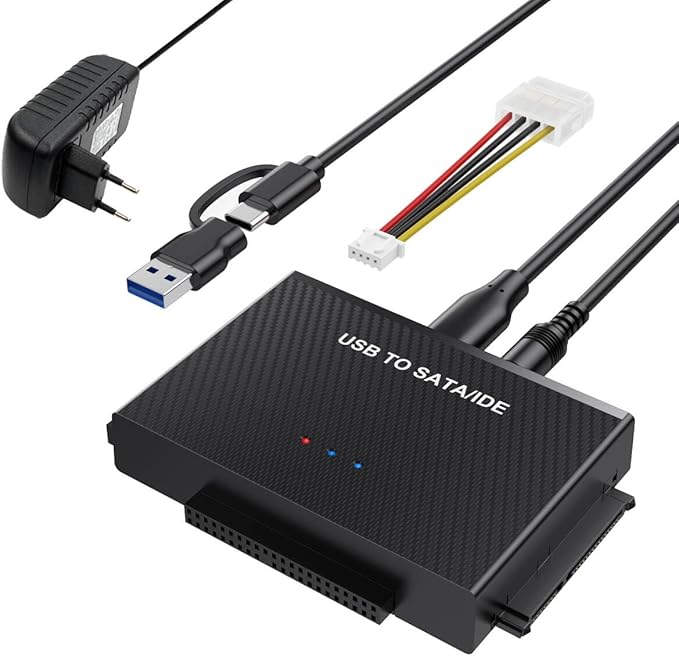
Data recovery and transfer from various hard drive formats can be a cumbersome task, especially with older drives. The BKELHS USB 3.0 to SATA/IDE Adapter aims to simplify this process by supporting a broad range of hard drives, including 2.5"/3.5" HDDs and SSDs, along with DVD/CD drives. By providing a dual-interface for both USB and USB-C connectivity, it bridges the standard compatibility gap seen in modern and legacy systems.
Pros & Cons
- Pros:
- Universal compatibility with both SATA and IDE drives.
- Supports high data transfer speeds up to 5 Gbps.
- Dual interface (USB and USB-C) enhances device compatibility.
- Includes a robust 12V/2A power adapter for stable performance with older drives.
-
Hot-swapping capability increases convenience during operation.
-
Cons:
- Requires additional setup for IDE drives, such as jumper setting.
- SSD performance can be limited by external factors besides the adapter speed, e.g., the connected device's configuration.
- While it supports broad formats, excessive cords may clutter workspace.
- The adapter's physical build isn't particularly rugged.
Comparison
Comparing the BKELHS Hard Drive Adapter to others like the Inateck Universal Hard Disk Adapter highlights key distinctions. The BKELHS stands out with its additional USB-C support and a dedicated power supply, which are not always included in competitors like Inateck. However, some alternatives may offer more durable casing options, which could be preferred for high-volume or field use. In terms of data transfer speeds, BKELHS's performance is competitive, but the real advantage comes with its broader compatibility and robust power delivery for older drives.
User Tips / Usage Guide
-
Initial Setup: Before usage, ensure that your drive is connected to the appropriate port (SATA or IDE) on the adapter and that all connections are firm to avoid disruptions.
-
Power Requirements: For 3.5" IDE and some older SATA drives, connect the provided 12V/2A power adapter and the 4-pin power cable to ensure the drive has sufficient power.
-
Jumper Settings: If you're using older IDE drives, remember to set the jumper configuration to 'Slave' to function correctly with the adapter.
-
Disk Initialization: New drives need to be initialized via Disk Management on Windows first so they can be recognized and used effectively.
-
Avoid Hot-plugging IDE Drives: For stability and safety, connect or disconnect IDE drives while the system is off.
-
Check USB Connection Type: Use the USB-C or USB-A connector as per your computer’s requirements to prevent connectivity issues.
-
Keep Workstation Uncluttered: Manage and organize cables effectively to avoid tangling and potential damage to connectors.
-
Post-Transfer Drive Safety: Always safely eject drives post data transfer to prevent data corruption.
Conclusion
The BKELHS USB 3.0 to SATA/IDE Adapter is a commendable choice for users needing seamless connectivity between varied drive types and modern computers. Its broad compatibility, straightforward setup, and robust power supply make it suitable for tech enthusiasts and IT professionals dealing with both new and legacy drives. IDEAL BUYER? Those engaged in data recovery projects, maintenance of older systems, or needing regular swap-outs of assorted disks would notably benefit from this all-in-one solution.