Introduction
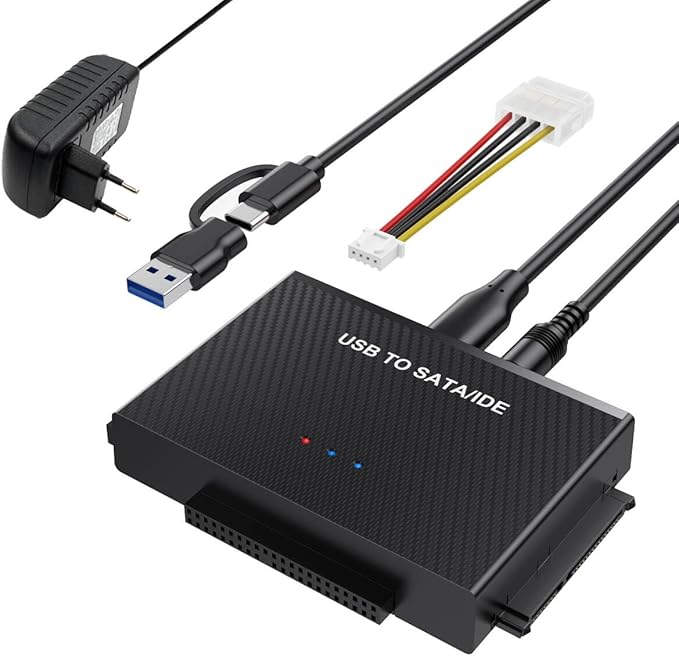
As a busy homeowner with various tech gadgets strewn around, finding a solution for data retrieval and backup can sometimes feel overwhelming. For those of us not ready to let go of our trusty old hard drives or who enjoy tinkering with old computer setups, the BKELHS Hard Drive Reader USB 3.0 Adapter is a game-changer. This little nifty device means you can easily connect old drives to modern computers for quick data recovery and backup. Especially if you have kids who love carrying laptops around or you frequently swap computers in a small apartment, having a universal tool like this is convenient and simplifies life considerably.
Pros & Cons
- Pros:
- Supports a wide range of devices including 2.5"/3.5" HDD, SSD, and optical drives.
- High-speed data transfer with up to 5Gbps via USB 3.0.
- Includes a robust power adapter for stable connection to older drives.
- The dual USB + USB-C port design caters to different laptop connections.
-
Hot-swappable feature saves time when connecting/disconnecting drives.
-
Cons:
- Basic instructions may require some tech savviness to set up initially.
- USB cable length might be short for some setups.
- Not all older drives may fit directly without additional setup.
Comparison
Compared to similar products, the BKELHS adapter offers better flexibility with its dual-port design accommodating both USB-A and USB-C connections. This versatility makes it suitable for newer laptops without needing additional dongles. While other adapters might require additional power, the 12V/2A power adapter included with this model allows for more stable performance with older hard drives and optical drives. Although others in the market may have longer cables or more beginner-friendly instructions, for a confident user, this product delivers excellent performance and reliability.
User Tips / Usage Guide
- Initial Setup: For any new hard drives, navigate to your computer's 'Disk Management' to initialize the drive before use.
- Use with Care: While hot-swappable, always eject drives properly to avoid data corruption.
- Secure Connections: Ensure that all cables are tightly connected before turning your devices on.
- Cable Management: Consider purchasing extension cables if you find the included USB cable too short for your setup.
- Understanding Modes: When using older IDE drives, remember to set them in 'slave' mode to avoid conflicts.
- Power Supply: Use the provided power adapter for any 3.5" HDDs or optical drives to ensure they run seamlessly.
- Software Utilities: Leverage free diagnostic tools for any data recovery tasks to monitor disk health.
- Use on Flat Surfaces: To prevent any accidental disconnections or data loss, use the adapter on stable, flat surfaces.
Conclusion
For tech enthusiasts and homeowners alike, the BKELHS Hard Drive Reader USB 3.0 Adapter is worth its weight in gold, mainly for its versatility and robust data transfer capabilities. It's especially beneficial if you're regularly moving files between older drives and more modern devices. Although it may require a bit of tech knowledge to set up, its durable construction and flexibility make it a valuable solution for data recovery and management. For long-term use, whether you're backing up old family photos or just making sure all your data is protected, this adapter certainly pulls its weight, saving both time and money in the long run.